> For the complete documentation index, see [llms.txt](https://docs.graphite-note.com/graphite-note-documentation/llms.txt). Markdown versions of documentation pages are available by appending `.md` to page URLs; this page is available as [Markdown](https://docs.graphite-note.com/graphite-note-documentation/graphite-note-models/machine-learning-models/basket-analysis.md).
# Basket Analysis
### About **Model**
In many retail and e-commerce environments, customers rarely purchase a single item. Instead, they buy groups of items that naturally belong together. Understanding these hidden relationships is invaluable for improving store layout, driving cross-sell and upsell strategies, designing bundles, and planning promotions.
Basket Analysis uncovers these meaningful combinations. It identifies which items frequently appear together in the same transaction and highlights strong associations among them. The model returns three key insights:
* **Frequent Items:** Which products appear most often.
* **Pair Rules:** Which two items tend to be purchased together.
* **Triplet Rules:** Which three-item combinations frequently co-occur.
Basket Analysis is powered by association-rule mining and uses standard industry metrics—**support**, **confidence**, and **lift**—to measure the strength of product relationships.
The goal is simple:\
Help companies understand what customers naturally buy together so they can take immediate action to increase revenue, improve merchandising, and optimize stock decisions.
***
### **Required Columns**
To run a Basket Analysis, your dataset must include three required fields:
#### **1. Order ID**
A unique identifier representing each customer transaction or basket.\
Examples: invoice number, bill number, transaction ID.
#### **2. Items**
The name or identifier of the purchased product in each row.\
Every row represents *one item inside a specific transaction*.
#### **3. Item Quantities**
The number of units sold for that item within the transaction.
Graphite Note automatically handles multiple units, duplicates inside the same order, and cleans the dataset before analysis.
***
### **Advanced Settings**
Basket Analysis includes configurable thresholds that balance model performance, speed, and insight quality. These parameters allow users to control how rare or frequent an itemset must be to be considered relevant.
#### **Step 1: Ignore Very Rare Items**
This parameter filters out items that appear in only a tiny fraction of transactions.
* **Why it matters:**\
Very rare items introduce noise and lead to extremely large rule sets with little business value.
* **Allowed range:** 0.000001 – 0.05
* **Example:** A value of 0.00005 (0.005%) means any item appearing in less than 0.005% of transactions will be excluded.
Higher thresholds produce faster, cleaner results.
***
#### **Step 2: Minimum Basket Frequency**
This determines how common a pair or triplet must be to be analyzed.
* **Why it matters:**\
Setting a minimum ensures you focus on patterns with meaningful sample size.
* **Allowed range:** 0.0001 – 0.20
* **Example:** 0.001 (0.1%) means a pair must appear in at least 0.1% of all orders.
Lower values allow rare but potentially interesting combinations to surface.\
Higher values return only very frequent itemsets.
***
#### **Step 3: Rule Strength Metric**
You can choose how association strength is evaluated:
* **Lift** (default): Measures how much more likely items appear together than by random chance.
* **Confidence:** Probability that B is purchased when A is purchased.
Use Lift when you want reliable cross-sell signals.\
Use Confidence when evaluating predictability.
**Minimum Rule Strength** filters out weak relationships.
* **Lift range:** 1–50
* **Confidence range:** 0.05–1.0
***
#### **Exclude Items (Optional)**
You can remove specific items from the analysis (e.g., shipping fees, packaging material).
Enter comma-separated, quoted names.\
Example: `"SERVICE FEE", "PACKAGING"`.
***
## **Model Results**
Once the scenario runs, Basket Analysis provides four structured results sections:
***
### **Overview**
The Overview page summarizes your dataset after cleaning and transformation. It includes:
* **Transactions Analyzed** – Total number of baskets processed.
* **Total Unique Items (before cleaning)** – All item types found in the dataset.
* **Items Kept After Cleaning** – Items retained after removing ultra-rare entries.
* **Average Basket Size** – Typical number of items per transaction.
* **Pruning Ratio** – Percentage of items removed due to rarity thresholds.
This gives you a clear view of data quality and model scope before diving into pair and triplet patterns.
***
### **Frequent Items**
This tab highlights the **Top Items by Support**, showing which products appear most often across all transactions.
Support is defined as:
> **Support = (Number of transactions containing the item) ÷ (Total transactions)**
This view is useful for:
* Identifying top sellers
* Planning replenishment and stock levels
* Understanding core product demand patterns
Each listed item displays:
* The number of orders it appears in
* Its support percentage
* A visual bar indicator for quick comparison
***
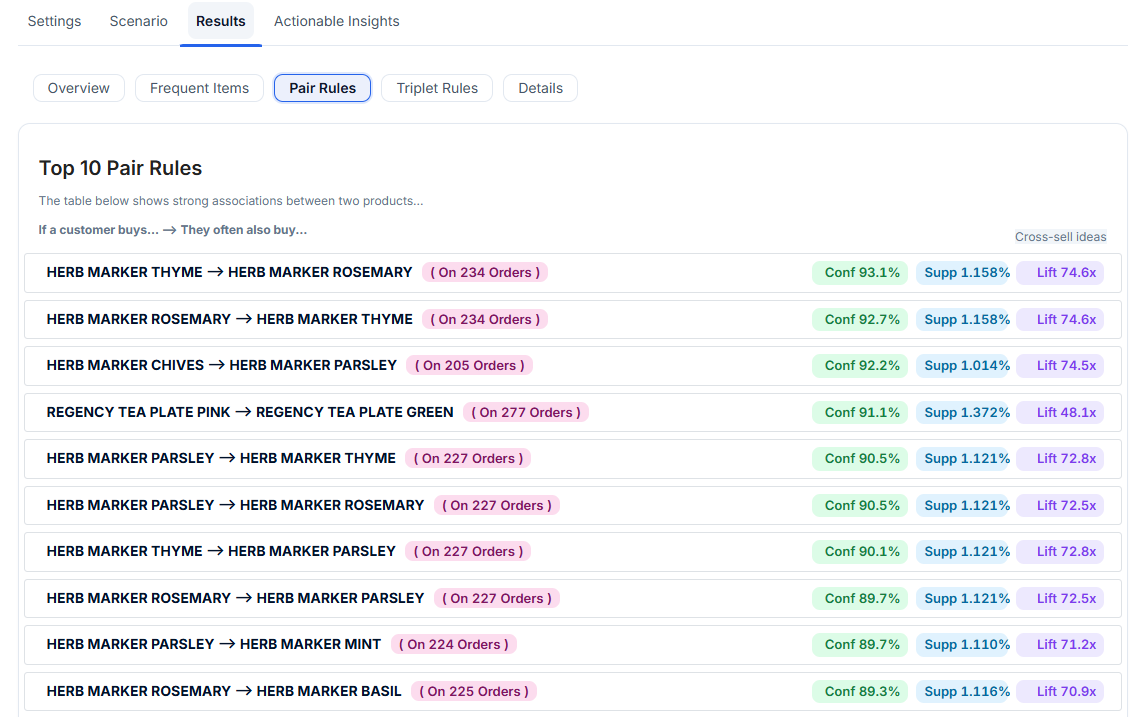
### **Pair Rules**
Pair Rules uncover strong two-item associations.\
This section answers:\
**“If a customer buys item A, which item B do they also tend to buy?”**
Each rule includes:
* **Occurrences** – How many transactions contain both items.
* **Confidence** – Probability B appears when A appears.
* **Support** – How common this pair is across all transactions.
* **Lift** – How much stronger the association is compared to random chance.
High-lift rules indicate meaningful cross-sell opportunities—ideal for:
* Recommender systems
* Combo deals
* Checkout suggestions
* Shelf placement optimization
***
### **Triplet Rules**
Triplet Rules identify combinations of **three items** that frequently appear together.\
This reveals natural bundles and multi-product purchasing patterns.
For each triplet, you see:
* **Occurrences across transactions**
* **Confidence of the three-item combination**
* **Support percentage**
* **Lift score**, showing the strength of the trio relationship
Triplet rules are often used to design bundles, seasonal sets, curated gift packs, or promotions around complementary items.
***
### **Details**
The Details tab provides full access to:
* Frequency tables for items
* All pairwise rules (in sortable table form)
* All triplet rules
* Internal metrics used in rule creation
* Filtered itemsets after pruning
* Support and confidence thresholds applied
This is the best place for analysts who want granular, technical output.
***
## **Actionable Insights**
Graphite Note automatically generates an **Executive Strategy Brief**, converting the statistical results into clear business recommendations.
The brief includes:
#### **1. Executive Summary**
A plain-language overview of what the analysis revealed, including key product relationships and opportunities.
#### **2. Metrics Explained (for Business Users)**
Definitions and clear examples of:
* **Support**
* **Confidence**
* **Lift**
Written so non-technical stakeholders can understand what makes a rule strong or weak.
#### **3. What We Analyzed**
Overview of dataset filtering, thresholds applied, and the focus of the model (frequent items, pairs, triplets).
#### **4. Recommended Actions**
Graphite Note generates ready-to-implement steps such as:
* Cross-sell suggestions
* Bundle ideas
* Merchandising improvements
* Promotional opportunities
* Product placement strategies
All grounded directly in the discovered rules.
***
## **API Access**
You can retrieve model results programmatically through the **Model Results API**.\
This allows automated ingestion into dashboards, recommendation engines, or custom applications.
#### **Python Example**
```python
import requests
url = "https://app.graphite-note.com/api/model/fetch-result/"
headers = {
"Authorization": "Bearer ",
"Content-Type": "application/json"
}
payload = {
"page-size": 100,
"page": 1
}
response = requests.post(url, json=payload, headers=headers)
print(response.json())
```
The API returns paginated data, including:
* Frequent items
* Pair rules
* Triplet rules
* All model metadata
* All computed metrics
This enables seamless integration into downstream systems.
---
# Agent Instructions
This documentation is published with GitBook. GitBook is the documentation platform designed so that both humans and AI agents can read, navigate, and reason over technical content effectively. Learn more at gitbook.com.
## Querying This Documentation
If you need additional information that is not directly available in this page, you can query the documentation by asking a question.
Perform an HTTP GET request on the following URL with the `ask` and `goal` query parameters:
```
GET https://docs.graphite-note.com/graphite-note-documentation/graphite-note-models/machine-learning-models/basket-analysis.md?ask=&goal=
```
`ask` is the immediate question: it should be specific, self-contained, and written in natural language.
`goal` is what the user is ultimately trying to achieve, the reason they need the answer. Sharing it helps GitBook give you a better, more relevant answer. A goal is most helpful when it describes the outcome the user wants rather than restating the question. For example, with `ask=how do I create an API token`, a goal like `automate deployments from our CI pipeline` lets GitBook tailor the answer to that use case.
The response will contain a direct answer to the question and relevant excerpts and sources from the documentation.
Use this mechanism when the answer is not explicitly present in the current page, you need clarification or additional context, or you want to retrieve related documentation sections.